GPU Sharing User guide
Important Note
Note GPU sharing is deprecated in volcano v1.9, recommended to use the Volcano VGPU feature, which is provided by HAMI project, click here
Environment setup
Install volcano
1. Install from source
Refer to Install Guide to install volcano.
After installed, update the scheduler configuration:
kubectl edit cm -n volcano-system volcano-scheduler-configmap
For volcano v1.8.2+(v1.8.2 excluded), use the following configMap
kind: ConfigMap
apiVersion: v1
metadata:
  name: volcano-scheduler-configmap
  namespace: volcano-system
data:
  volcano-scheduler.conf: |
    actions: "enqueue, allocate, backfill"
    tiers:
    - plugins:
      - name: priority
      - name: gang
      - name: conformance
    - plugins:
      - name: drf
      - name: deviceshare
        arguments:
          deviceshare.GPUSharingEnable: true # enable gpu sharing
      - name: predicates
      - name: proportion
      - name: nodeorder
      - name: binpack
For volcano v1.8.2-(v1.8.2 included), use the following configMap
kind: ConfigMap
apiVersion: v1
metadata:
  name: volcano-scheduler-configmap
  namespace: volcano-system
data:
  volcano-scheduler.conf: |
    actions: "enqueue, allocate, backfill"
    tiers:
    - plugins:
      - name: priority
      - name: gang
      - name: conformance
    - plugins:
      - name: drf
      - name: predicates
        arguments:
          predicate.GPUSharingEnable: true # enable gpu sharing
      - name: proportion
      - name: nodeorder
      - name: binpack
2. Install from release package
Same as above, after installed, update the scheduler configuration in volcano-scheduler-configmap configmap.
Install Volcano device plugin
Please refer to volcano device plugin
- By default volcano device plugin supports shared GPUs, users do not need to config volcano device plugin. Default setting is the same as setting --gpu-strategy=share. For more information volcano device plugin configuration
Verify environment is ready
Check the node status, it is ok if volcano.sh/gpu-memory and volcano.sh/gpu-number are included in the allocatable resources.
$ kubectl get node {node name} -oyaml
...
status:
  addresses:
  - address: 172.17.0.3
    type: InternalIP
  - address: volcano-control-plane
    type: Hostname
  allocatable:
    cpu: "4"
    ephemeral-storage: 123722704Ki
    hugepages-1Gi: "0"
    hugepages-2Mi: "0"
    memory: 8174332Ki
    pods: "110"
    volcano.sh/gpu-memory: "89424"
    volcano.sh/gpu-number: "8"    # GPU resource
  capacity:
    cpu: "4"
    ephemeral-storage: 123722704Ki
    hugepages-1Gi: "0"
    hugepages-2Mi: "0"
    memory: 8174332Ki
    pods: "110"
    volcano.sh/gpu-memory: "89424"
    volcano.sh/gpu-number: "8"   # GPU resource
Running GPU Sharing Jobs
NVIDIA GPUs can now be shared via container level resource requirements using the resource name volcano.sh/gpu-memory:
$ cat <<EOF | kubectl apply -f -
apiVersion: v1
kind: Pod
metadata:
  name: gpu-pod1
spec:
  schedulerName: volcano
  containers:
    - name: cuda-container
      image: nvidia/cuda:9.0-devel
      command: ["sleep"]
      args: ["100000"]
      resources:
        limits:
          volcano.sh/gpu-memory: 1024 # requesting 1024MB GPU memory
EOF

$ cat <<EOF | kubectl apply -f -
apiVersion: v1
kind: Pod
metadata:
  name: gpu-pod2
spec:
  schedulerName: volcano
  containers:
    - name: cuda-container
      image: nvidia/cuda:9.0-devel
      command: ["sleep"]
      args: ["100000"]
      resources:
        limits:
          volcano.sh/gpu-memory: 1024 # requesting 1024MB GPU memory
EOF
If only the above pods are claiming gpu resource in a cluster, you can see the pods sharing one gpu card:
$ kubectl exec -ti  gpu-pod1 env
...
VOLCANO_GPU_MEMORY_TOTAL=11178
VOLCANO_GPU_ALLOCATED=1024
NVIDIA_VISIBLE_DEVICES=0
...

$ kubectl exec -ti  gpu-pod1 env
...
VOLCANO_GPU_MEMORY_TOTAL=11178
VOLCANO_GPU_ALLOCATED=1024
NVIDIA_VISIBLE_DEVICES=0
...
Understanding how GPU sharing works
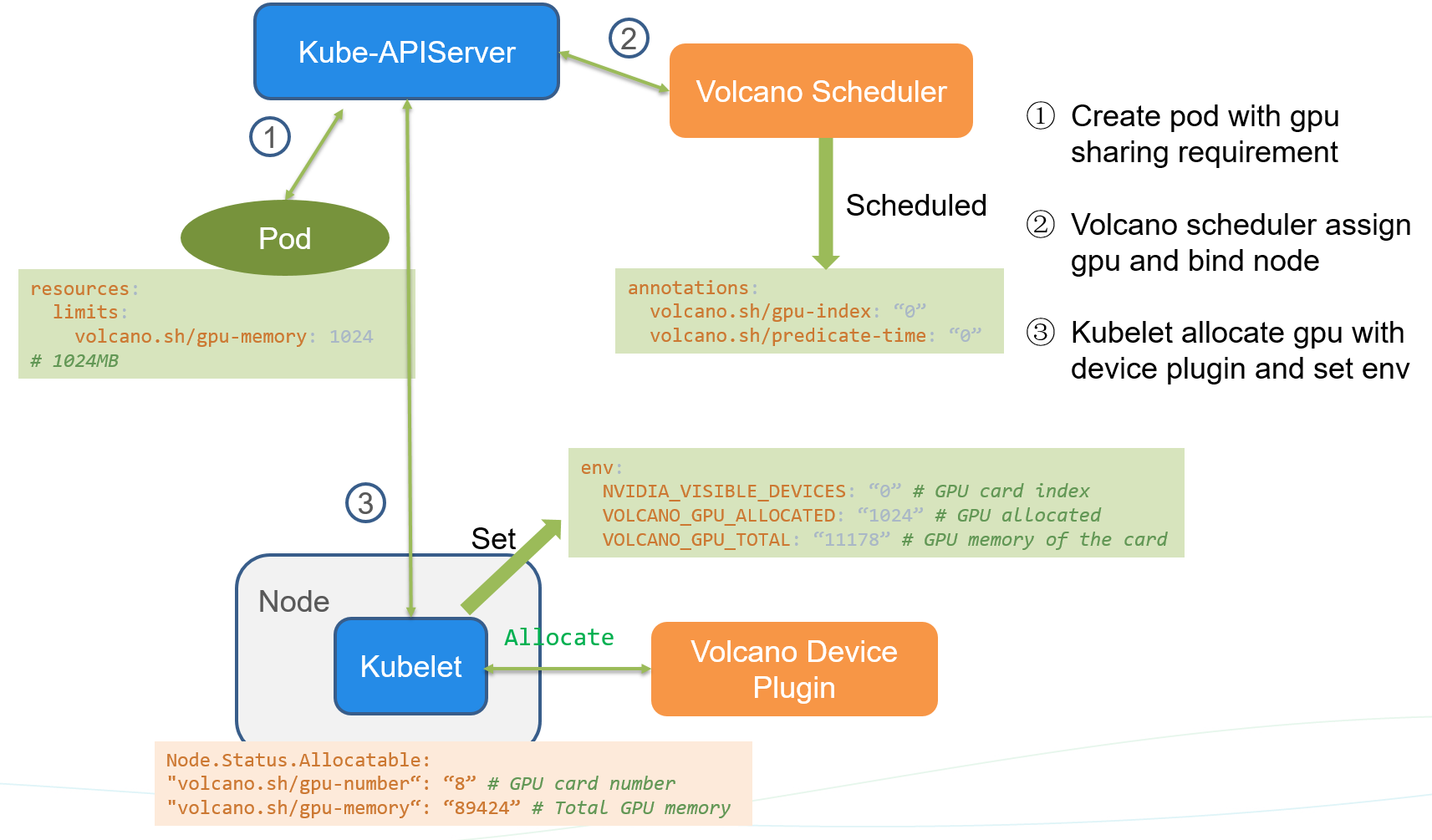
The GPU sharing workflow is depicted as below:
-
create a pod with
volcano.sh/gpu-memoryresource request, -
volcano scheduler predicates and allocate gpu resource for the pod. Adding the below annotation
annotations:
  volcano.sh/gpu-index: "0"
  volcano.sh/predicate-time: "1593764466550835304"
- kubelet watches the pod bound to itself, and call allocate API to set env before running the container.
env:
  NVIDIA_VISIBLE_DEVICES: "0" # GPU card index
  VOLCANO_GPU_ALLOCATED: "1024" # GPU allocated
  VOLCANO_GPU_MEMORY_TOTAL: "11178" # GPU memory of the card