Priority
Overview
The Priority Plugin provides the implementation of job and task sorting, as well as PreemptableFn—a function that calculates which jobs can be preempted. Jobs are sorted according to priorityClassName, and tasks are sorted in turn by priorityClassName, createTime, and id.
How It Works
The Priority plugin implements several key functions:
- JobOrderFn: Compares two jobs and determines their relative priority based on
job.spec.priorityClassName - TaskOrderFn: Compares two tasks and determines their relative priority by comparing
task.priorityClassName,task.createTime, andtask.idin order - PreemptableFn: Identifies tasks that can be preempted based on priority levels
Scenario
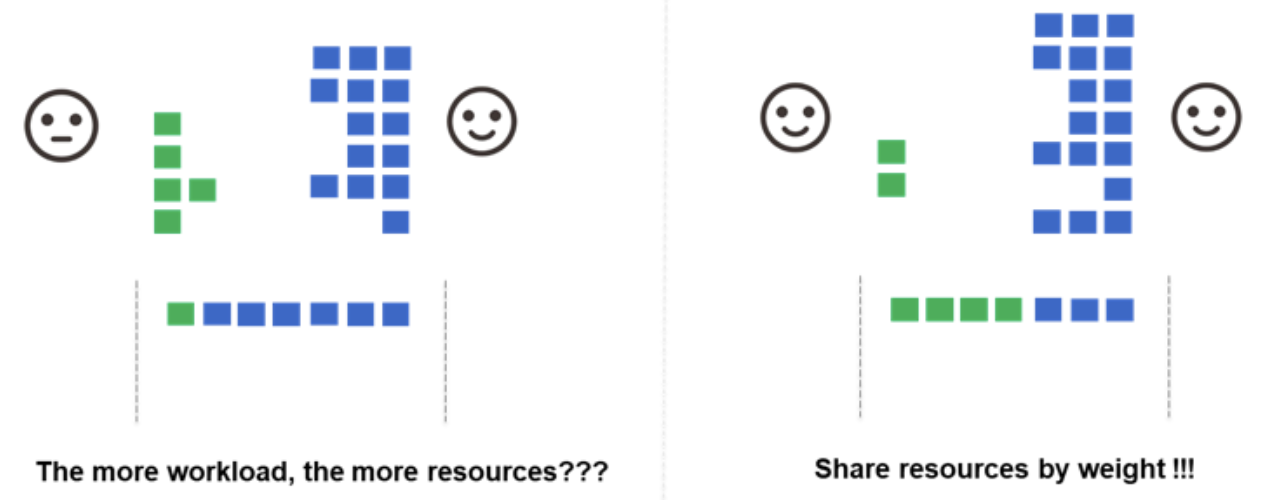
When the cluster runs multiple jobs but is low on resources, and each job has a different number of Pods waiting to be scheduled, using the Kubernetes default scheduler would result in jobs with more Pods ultimately getting more of the cluster's resources. In this case, the Volcano Scheduler provides algorithms that enable different jobs to share cluster resources in a fair-share manner.
Custom Priority Levels
The Priority Plugin enables users to customize their job and task priorities, and to configure scheduling policies at different levels according to their own needs. Priority is arranged according to Job's priorityClassName at the application level.
Real-time Requirements
For clusters with applications requiring high real-time performance, such as:
- Financial services scenarios
- IoT monitoring scenarios
- Real-time analytics
The Priority Plugin can ensure that these high-priority workloads are scheduled first.
Configuration
The Priority plugin is typically placed in the first tier of plugins:
tiers:
- plugins:
  - name: priority
  - name: gang
  - name: conformance
Example
Creating Priority Classes
First, create the PriorityClasses in your cluster:
apiVersion: scheduling.k8s.io/v1
kind: PriorityClass
metadata:
  name: high-priority
value: 1000000
globalDefault: false
description: "High priority for critical workloads"
---
apiVersion: scheduling.k8s.io/v1
kind: PriorityClass
metadata:
  name: low-priority
value: 1000
globalDefault: false
description: "Low priority for batch workloads"
Using Priority in VolcanoJob
Then reference the priority class in your jobs:
apiVersion: batch.volcano.sh/v1alpha1
kind: Job
metadata:
  name: high-priority-job
spec:
  schedulerName: volcano
  priorityClassName: high-priority
  minAvailable: 1
  tasks:
  - replicas: 1
    name: task
    template:
      spec:
        priorityClassName: high-priority
        containers:
        - name: worker
          image: busybox
          command: ["sleep", "1000"]
In this example, the job with high-priority will be scheduled before jobs with low-priority when resources are limited.